華為認證知識點:項目拓撲與項目需求
摘要:為了幫助考生備考華為認證考試,希賽網(wǎng)為考生整理了華為認證知識點:項目拓撲與項目需求,希望對考生了解項目拓撲與項目需求相關知識有幫助。
項目拓撲與項目需求
項目需求
某企業(yè)網(wǎng)絡組網(wǎng)如下:vlan10屬于辦公網(wǎng)絡,vlan20外來人員訪客網(wǎng)絡,vlan30 屬于云桌面網(wǎng)絡。還包括公共服務器,所屬vlan為100。
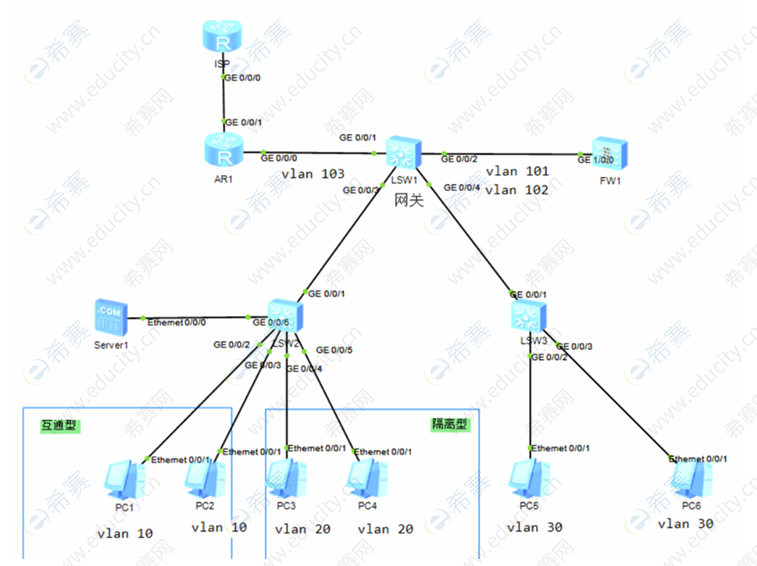
需要實現(xiàn)如下需求:
vlan10 和vlan20 和vlan100屬于相同網(wǎng)段,需要在LSW2上部署mux-vlan 實現(xiàn)辦公網(wǎng)絡之間可以互相網(wǎng)絡,訪客網(wǎng)絡無法互相二層互訪,vlan10和vlan20 都可以訪問公共服務器,公共服務器屬于vlan100。
vlan30 中的PC5和PC6無法實現(xiàn)二層互訪,使用端口對其進行隔離。
DHCP服務器部署在FW1上,使用DHCP中繼的方式給終端分配ip地址。serveAR1 有固定的ip。
vlan10 和vlan 20 與 vlan30 需要在網(wǎng)關設備上實現(xiàn)三層隔離,如果有互訪需求,流量一定需要經(jīng)過防火墻設備,來保證互訪流量的安全性。
vlan10 和vlan20的設備可以訪問共有網(wǎng)絡,但是vlan30無法訪問公網(wǎng)。
實驗步驟
步驟1:設備重命名以及IP地址的配置
注意:PC可事先配置靜態(tài)IP,方便測試,后期使用DHCP
IP網(wǎng)段規(guī)劃:
vlan10 vlan 20 vlan 100:10.0.100.0/24
vlan30:10.0.30.0/24
vlan 101 :10.0.101.0/24
vlan 102 : 10.0.102.0/24
vlan 103 : 10.0.103.0/24
AR1 – ISP:100.1.1.0/24
步驟2:部署Mux-vlan,實現(xiàn)vlan10內(nèi)部互相訪問,vlan20內(nèi)部無法互相訪問,10 20都可以訪問服務器
LSW2的配置:
[LSW2]vlan batch 10 20 100
Info: This operation may take a few seconds. Please wait for a moment...done.
[LSW2-vlan100]mux-vlan //創(chuàng)建vlan 使能 使其變成mux的主vlan
配置其他vlan成為互通和隔離型vlan
[LSW2-vlan100]subordinate group 10 //互通
[LSW2-vlan100]subordinate separate 20 //隔離
[LSW2-GigabitEthernet0/0/2]port link-type access
[LSW2-GigabitEthernet0/0/2]port default vlan 10
[LSW2-GigabitEthernet0/0/2]port mux-vlan enable
[LSW2-GigabitEthernet0/0/3]port link-type access
[LSW2-GigabitEthernet0/0/3]port default vlan 10
[LSW2-GigabitEthernet0/0/3]port mux-vlan enable
[LSW2-GigabitEthernet0/0/4]port link-type access
[LSW2-GigabitEthernet0/0/4]port default vlan 20
[LSW2-GigabitEthernet0/0/4]port mux-vlan enable
[LSW2-GigabitEthernet0/0/5]port link-type access
[LSW2-GigabitEthernet0/0/5]port default vlan 20
[LSW2-GigabitEthernet0/0/5]port mux-vlan enable
[LSW2-GigabitEthernet0/0/6]port link-type access
[LSW2-GigabitEthernet0/0/6]port default vlan 100
[LSW2-GigabitEthernet0/0/6]port mux-vlan enable
測試:
PC1pingPC2:
PC>ping 10.0.100.2
Ping 10.0.100.2: 32 data bytes, Press Ctrl_C to break
From 10.0.100.2: bytes=32 seq=1 ttl=128 time=47 ms
From 10.0.100.2: bytes=32 seq=2 ttl=128 time=31 ms
From 10.0.100.2: bytes=32 seq=3 ttl=128 time=32 ms
From 10.0.100.2: bytes=32 seq=4 ttl=128 time=31 ms
From 10.0.100.2: bytes=32 seq=5 ttl=128 time=31 ms
--- 10.0.100.2 ping statistics ---
5 packet(s) transmitted
5 packet(s) received
0.00% packet loss
round-trip min/avg/max = 31/34/47 ms
PC1ping服務器:
PC>ping 10.0.100.100
Ping 10.0.100.100: 32 data bytes, Press Ctrl_C to break
From 10.0.100.100: bytes=32 seq=1 ttl=255 time=15 ms
From 10.0.100.100: bytes=32 seq=2 ttl=255 time=16 ms
From 10.0.100.100: bytes=32 seq=3 ttl=255 time=16 ms
From 10.0.100.100: bytes=32 seq=4 ttl=255 time=15 ms
From 10.0.100.100: bytes=32 seq=5 ttl=255 time<1 ms
--- 10.0.100.100 ping statistics ---
5 packet(s) transmitted
5 packet(s) received
0.00% packet loss
round-trip min/avg/max = 0/12/16 ms
PC1pingPC3:
PC>ping 10.0.100.3
Ping 10.0.100.3: 32 data bytes, Press Ctrl_C to break
From 10.0.100.1: Destination host unreachable
From 10.0.100.1: Destination host unreachable
From 10.0.100.1: Destination host unreachable
From 10.0.100.1: Destination host unreachable
From 10.0.100.1: Destination host unreachable
--- 10.0.100.3 ping statistics ---
5 packet(s) transmitted
0 packet(s) received
100.00% packet loss
不通,互通和隔離型的vlan無法互相訪問
PC3去訪問服務器和PC4
PC>ping 10.0.100.4
Ping 10.0.100.4: 32 data bytes, Press Ctrl_C to break
From 10.0.100.3: Destination host unreachable
From 10.0.100.3: Destination host unreachable
From 10.0.100.3: Destination host unreachable
From 10.0.100.3: Destination host unreachable
From 10.0.100.3: Destination host unreachable
--- 10.0.100.4 ping statistics ---
5 packet(s) transmitted
0 packet(s) received
100.00% packet loss
PC>ping 10.0.100.100
Ping 10.0.100.100: 32 data bytes, Press Ctrl_C to break
From 10.0.100.100: bytes=32 seq=1 ttl=255 time=16 ms
From 10.0.100.100: bytes=32 seq=2 ttl=255 time=16 ms
From 10.0.100.100: bytes=32 seq=3 ttl=255 time=31 ms
From 10.0.100.100: bytes=32 seq=4 ttl=255 time=15 ms
From 10.0.100.100: bytes=32 seq=5 ttl=255 time<1 ms
--- 10.0.100.100 ping statistics ---
5 packet(s) transmitted
5 packet(s) received
0.00% packet loss
round-trip min/avg/max = 0/15/31 ms
步驟3:配置端口隔離,實現(xiàn)PC5和PC6無法互訪
LSW1的配置:
[LSW1]vlan batch 10 20 30 100
Info: This operation may take a few seconds. Please wait for a moment...done.
[LSW1-Vlanif100]ip address 10.0.100.254 24
[LSW1-Vlanif100]interface g0/0/3
[LSW1-GigabitEthernet0/0/3]port link-type access
[LSW1-GigabitEthernet0/0/3]port default vlan 100 //使用主vlan通信
LSW2的配置:
[LSW2-GigabitEthernet0/0/1]port link-type access
[LSW2-GigabitEthernet0/0/1]port default vlan 100
[LSW2-GigabitEthernet0/0/1]port mux-vlan enable
測試vlan10 20 100與LSW1的網(wǎng)絡聯(lián)通性:
PC>ping 10.0.100.254 // PC1 ping LSW1
Ping 10.0.100.254: 32 data bytes, Press Ctrl_C to break
From 10.0.100.254: bytes=32 seq=1 ttl=255 time=63 ms
From 10.0.100.254: bytes=32 seq=2 ttl=255 time=31 ms
From 10.0.100.254: bytes=32 seq=3 ttl=255 time=47 ms
From 10.0.100.254: bytes=32 seq=4 ttl=255 time=47 ms
From 10.0.100.254: bytes=32 seq=5 ttl=255 time=31 ms
--- 10.0.100.254 ping statistics ---
5 packet(s) transmitted
5 packet(s) received
0.00% packet loss
round-trip min/avg/max = 31/43/63 ms
配置云桌面
[LSW3-GigabitEthernet0/0/2]port link-type access
[LSW3-GigabitEthernet0/0/2]port default vlan 30
[LSW3-GigabitEthernet0/0/3]port link-type access
[LSW3-GigabitEthernet0/0/3]port default vlan 30
做端口隔離加入同一個組
[LSW3-GigabitEthernet0/0/2]port-isolate enable group 1
[LSW3-GigabitEthernet0/0/2]interface g0/0/3
[LSW3-GigabitEthernet0/0/3]port-isolate enable group 1
[LSW3]display port-isolate group 1
The ports in isolate group 1:
GigabitEthernet0/0/2 GigabitEthernet0/0/3
配置vlan30的網(wǎng)關
[LSW1-GigabitEthernet0/0/4]port link-type trunk
[LSW1-GigabitEthernet0/0/4]port trunk allow-pass vlan 30
[LSW1-GigabitEthernet0/0/4]quit
[LSW1]interface Vlanif 30
[LSW1-Vlanif30]ip address 10.0.30.254 24
[LSW3-GigabitEthernet0/0/1]port link-type trunk
[LSW3-GigabitEthernet0/0/1]port trunk allow-pass vlan 30
測試:PC5 ping網(wǎng)關
PC>ping 10.0.30.254
Ping 10.0.30.254: 32 data bytes, Press Ctrl_C to break
From 10.0.30.254: bytes=32 seq=1 ttl=255 time=47 ms
From 10.0.30.254: bytes=32 seq=2 ttl=255 time=31 ms
From 10.0.30.254: bytes=32 seq=3 ttl=255 time=31 ms
From 10.0.30.254: bytes=32 seq=4 ttl=255 time=31 ms
From 10.0.30.254: bytes=32 seq=5 ttl=255 time=32 ms
--- 10.0.30.254 ping statistics ---
5 packet(s) transmitted
5 packet(s) received
0.00% packet loss
round-trip min/avg/max = 31/34/47 ms
步驟4:配置VPN實例,實現(xiàn)三層隔離,并實現(xiàn)互訪通過防火墻
1)創(chuàng)建實例A、B并與對應vlan綁定:
[LSW1]ip vpn-instance A
[LSW1-vpn-instance-A]route-distinguisher 100:1
[LSW1]ip vpn-instance B
[LSW1-vpn-instance-B]route-distinguisher 100:2
[LSW1-Vlanif100]ip binding vpn-instance A
[LSW1-Vlanif100]ip address 10.0.100.254 255.255.255.0
[LSW1-Vlanif30]ip binding vpn-instance B
[LSW1-Vlanif30]ip address 10.0.30.254 255.255.255.0
測試:PC5訪問PC1:
PC>ping 10.0.100.1
Ping 10.0.100.1: 32 data bytes, Press Ctrl_C to break
Request timeout!
Request timeout!
Request timeout!
Request timeout!
Request timeout!
--- 10.0.100.1 ping statistics ---
5 packet(s) transmitted
0 packet(s) received
100.00% packet loss
可知實現(xiàn)隔離
2)配置靜態(tài)路由,實現(xiàn)互訪經(jīng)過防火墻,實行流量監(jiān)控
LSW1的配置:
[LSW1]vlan batch 101 102 //創(chuàng)建互聯(lián)路由
Info: This operation may take a few seconds. Please wait for a moment...done.
[LSW1]interface Vlanif 101
[LSW1-Vlanif101]ip binding vpn-instance A
Info: AL IPv4 related configurations on this interface are removed!
Info: AL IPv6 related configurations on this interface are removed!
[LSW1-Vlanif101]ip address 10.0.101.1 24
[LSW1-Vlanif101]quit
[LSW1]interface Vlanif 102
[LSW1-Vlanif102]ip binding vpn-instance B
Info: AL IPv4 related configurations on this interface are removed!
Info: AL IPv6 related configurations on this interface are removed!
[LSW1-Vlanif102]ip address 10.0.102.1 24
[LSW1-GigabitEthernet0/0/2]port link-type trunk
[LSW1-GigabitEthernet0/0/2]port trunk allow-pass vlan 101 102 //放行101 102流量
FW1的配置:
[fw1]vlan batch 101 102
Info: This operation may take a few seconds. Please wait for a moment...done.
[fw1]interfaceVlanif101
[fw1-Vlanif101]ip address 10.0.101.2 24
[fw1]interfaceVlanif102
[fw1-Vlanif102]ip address 10.0.102.2 24
[fw1]Firewall zone trust //加入安全區(qū)
[fw1-zone-trust]add interface Vlanif101
[fw1-zone-trust]add interface Vlanif102
[fw1-GigabitEthernet1/0/0]portswitch
[fw1-GigabitEthernet1/0/0]port link-type t
[fw1-GigabitEthernet1/0/0]port link-type trunk
[fw1-GigabitEthernet1/0/0]port trunk allow-pass vlan 101 102
測試:LSW1ping FW1:
[fw1-Vlanif101]service-manage ping permit //開啟ping功能
[fw1-Vlanif102]service-manage ping permit
[LSW1]ping -vpn-instance A 10.0.101.2
PING 10.0.101.2: 56 data bytes, press CTRL_C to break
Reply from 10.0.101.2: bytes=56 Sequence=1 ttl=255 time=120 ms
Reply from 10.0.101.2: bytes=56 Sequence=2 ttl=255 time=20 ms
Reply from 10.0.101.2: bytes=56 Sequence=3 ttl=255 time=40 ms
Reply from 10.0.101.2: bytes=56 Sequence=4 ttl=255 time=30 ms
Reply from 10.0.101.2: bytes=56 Sequence=5 ttl=255 time=10 ms
--- 10.0.101.2 ping statistics ---
5 packet(s) transmitted
5 packet(s) received
0.00% packet loss
round-trip min/avg/max = 10/44/120 ms
配置靜態(tài)路由:
[LSW1]ip route-static vpn-instance A 10.0.30.0 24 10.0.101.2 //下一跳為防火墻接口
[fw1]ip route-static 10.0.30.0 24 10.0.102.1//交給LSW1的vlanif 102
回包:
[LSW1]ip route-static vpn-instance B 10.0.100.0 24 10.0.102.2
[fw1]ip route-static 10.0.100.0 24 10.0.101.1
測試:PC5訪問PC1:
PC>tracert 10.0.100.1
traceroute to 10.0.100.1, 8 hops max
(ICMP), press Ctrl+C to stop
1 10.0.30.254 47 ms 47 ms 31 ms
2 * * *
3 10.0.101.1 78 ms 94 ms 78 ms
4 10.0.100.1 141 ms 125 ms 125 ms
PC>
需求實現(xiàn),PC5通過防火墻訪問PC1
步驟5:配置DHCP中繼
FW1的配置:
[fw1]ip pool 1
Info: It is Successful to create an Ip address pool.
[fw1-ip-pool-1]network 10.0.100.0 mask 24
[fw1-ip-pool-1]gateway-list 10.0.100.254
[fw1-ip-pool-1]dns-list 114.114.114.114
[fw1]ip pool 2
Info: It is Successful to create an Ip address pool.
[fw1-ip-pool-2]network 10.0.30.0 mask 24
[fw1-ip-pool-2]gateway-list 10.0.30.254
[fw1-ip-pool-2]dns-list 8.8.8.8
[fw1]dhcp enable
Info: The operation may take a few seconds. Please wait for a moment.done.
[fw1-Vlanif101]dhcp select global //對接VPN實例A
[fw1-Vlanif101]interface vlanif102
[fw1-Vlanif102]dhcp select global
LSW1的配置:
[LSW1]dhcp enable
[LSW1-Vlanif100]hcp select relay
[LSW1-Vlanif100]dhcp relay server-ip 10.0.101.2
Vlanif30同理,配置不做贅述
步驟6:vlan10 和vlan20的設備可以訪問共有網(wǎng)絡,但是vlan30無法訪問公網(wǎng)
LSW1的配置:
[LSW1]vlan 103
[LSW1-Vlanif103]ip address 10.0.103.1 24
[LSW1-GigabitEthernet0/0/1]port link-type access
[LSW1-GigabitEthernet0/0/1]port default vlan 103
[LSW1-Vlanif103]ip binding vpn-instance A //綁定VPN實例A
Info: AL IPv4 related configurations on this interface are removed!
Info: AL IPv6 related configurations on this interface are removed!
[LSW1-Vlanif103]ip address 10.0.103.1 24
[LSW1]ip route-static vpn-instance A 0.0.0.0 0 10.0.103.2
AR1的配置:
[AR1-GigabitEthernet0/0/0]ip address 10.0.103.2 24
[AR1-GigabitEthernet0/0/1]ip address 100.1.1.1 24
[AR1]ip route-static 0.0.0.0 0 100.1.1.2
[AR1]acl 2000
[AR1-acl-basic-2000]rule permit source any
[AR1-acl-basic-2000]quit
[AR1]interface g0/0/1
[AR1-GigabitEthernet0/0/1]nat outbound 2000 //NAT
[AR1]ip route-static 10.0.100.0 24 10.0.103.1 //回程路由
ISP的配置:
[lsp]interface g0/0/0
[lsp-GigabitEthernet0/0/0]ip address 100.1.1.2 24
[lsp-LoopBack0]ip address 100.100.100.100 32 //模擬公網(wǎng)IP
測試:PC1訪問公網(wǎng):
PC>ping 100.100.100.100
Ping 100.100.100.100: 32 data bytes, Press Ctrl_C to break
From 100.100.100.100: bytes=32 seq=1 ttl=253 time=63 ms
From 100.100.100.100: bytes=32 seq=2 ttl=253 time=62 ms
From 100.100.100.100: bytes=32 seq=3 ttl=253 time=47 ms
From 100.100.100.100: bytes=32 seq=4 ttl=253 time=47 ms
From 100.100.100.100: bytes=32 seq=5 ttl=253 time=47 ms
--- 100.100.100.100 ping statistics ---
5 packet(s) transmitted
5 packet(s) received
0.00% packet loss
round-trip min/avg/max = 47/53/63 ms
PC5訪問公網(wǎng):
PC>ping 100.100.100.100
Ping 100.100.100.100: 32 data bytes, Press Ctrl_C to break
Request timeout!
Request timeout!
Request timeout!
Request timeout!
Request timeout!
--- 100.100.100.100 ping statistics ---
5 packet(s) transmitted
0 packet(s) received
100.00% packet loss
可知需求實現(xiàn)。

延伸閱讀
- 華為HCIP證書是什么?
- 華為HCIPDatacom認證怎么樣?
- 華為數(shù)通IP考什么?
- 華為數(shù)通IP考哪三門?
- 華為數(shù)通HCIE培訓機構哪家好?
- HCIE Lab是什么?

華為認證微信公眾號

華為認證備考資料免費領取
去領取

華為認證
-

華為認證直通車
-

HCIA-Datacom直播課程
-
HCIP-Datacom直播課程
-
HCIE-Datacom直播課程


 專注在線職業(yè)教育24年
 APP
APP  微信群
微信群  掃描二維碼
掃描二維碼
 掃描二維碼
掃描二維碼